ERC 214
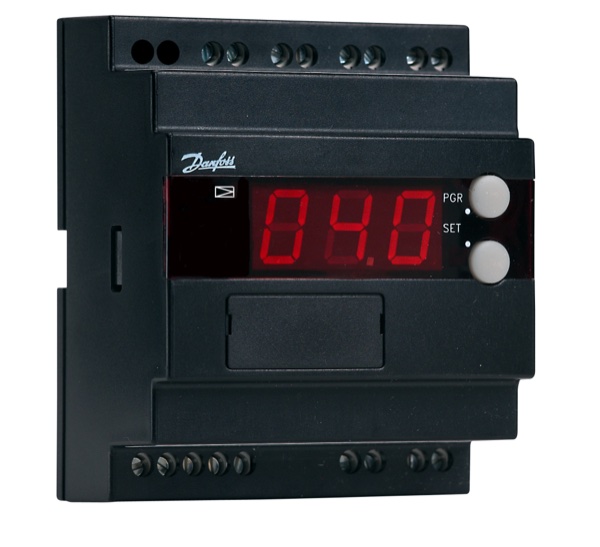
ERC Series • HVAC Controller
Quick Info
Output Functions
Electronic room controller with weekly timer
Technical Specifications
Display & Interface
| Display Type | LCD |
| Display Digits | 4 |
| Buttons | 6 |
| LED Indicators | Heat, Cool, Fan, Timer |
Power Supply
| Voltage | 230V AC |
| Voltage Range | 100-240V AC |
| Frequency | 50/60Hz |
| Power Consumption | 4VA |
Sensor Inputs
| Probe Inputs | 2 |
| Probe Type | NTC (built-in + remote) |
| Temp Range | 0 to 50°C |
| Accuracy | ±0.3°C |
Relay Outputs
| Relay Outputs | 4 |
| Relay Rating | 5A/250VAC |
Physical
| Panel Size | 86x86 mm |
| Depth | 45 mm |
| IP Rating | IP30 |
| Weight | 180 g |
Operating Conditions
| Operating Temp | 0 to 50°C |
| Storage Temp | -20 to 70°C |
Wiring Terminals
| Terminal | Function | Type | Wire Color |
|---|---|---|---|
| L | Power L | Input |
brown
|
| N | Power N | Input |
blue
|
| S | Remote Sensor | Input |
red/white
|
| Fan L | Fan Low | Output |
green
|
| Fan M | Fan Medium | Output |
yellow
|
| Fan H | Fan High | Output |
red
|
| V1 | Valve Heat | Output |
orange
|
| V2 | Valve Cool | Output |
blue
|
| AUX | Auxiliary | Output |
white
|
| A | RS485 A | Comm |
blue
|
| B | RS485 B | Comm |
yellow
|
Important: Always disconnect power before wiring. Verify terminal numbers with the actual controller label before connecting.
Parameter Settings
| Code | Parameter | Range | Default | Description |
|---|---|---|---|---|
| r01 | Comfort Setpoint | 10 to 35 | 22 °C | Occupied setpoint |
| r02 | Eco Setpoint | 10 to 35 | 18 °C | Unoccupied setpoint |
| r03 | Differential | 0.5 to 5 | 1 °C | Control differential |
| t01 | Schedule 1 On | 00:00 to 23:59 | 06:00 | Weekday on time |
| t02 | Schedule 1 Off | 00:00 to 23:59 | 22:00 | Weekday off time |
| t03 | Schedule 2 On | 00:00 to 23:59 | 08:00 | Weekend on time |
| t04 | Schedule 2 Off | 00:00 to 23:59 | 20:00 | Weekend off time |
| F01 | Fan Mode | 0=Auto, 1=Manual | 0 | Fan control mode |
| o01 | Operating Mode | 0=Heat, 1=Cool, 2=Auto | 2 | System mode |
Error Codes
Solution: Replace controller
Solution: Check sensor wiring
Solution: Reset or replace
Solution: Reset time and date
Frequently Asked Questions
Press PROG button and use arrows to set times for each day
Press MODE to switch to manual, automatic return at next schedule time
Alternative Models (Cross Reference)
Manufacturer Information
Brand: Danfoss
Country: Denmark